


Cozy Christmas Color
4.3119.00 Reviews
App Specs
- Version
- 1.0.4
- Updated On
- License
- Free
- Downloads
- 50,000+
- Developer
- Art Coloring Group
- Categories
- Board
- Platform
- Android
Screenshots
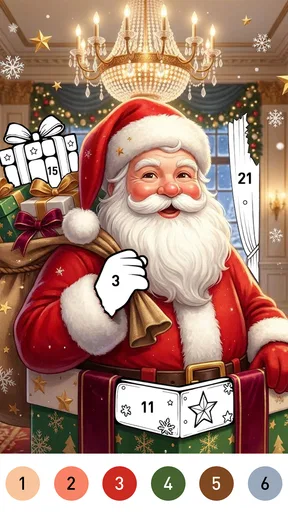






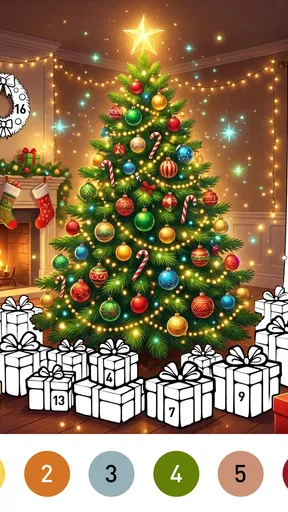
 Analysis by AppCompare
One everyday use I can picture is a tablet left on the kitchen counter during a busy evening. While dinner is finishing, one person can color for a few minutes; when the device is needed again, the activity can stop without having to gather pieces or explain a complicated turn. That convenience is the real household advantage here: the game fits around other plans rather than asking everyone to organize the evening around it.
I would still keep the tablet somewhere adults can reach if children will use it. That makes it easier to supervise purchases and settle turn-taking, without assuming the game itself provides household controls. For a family that already shares devices, a simple verbal rule—whose turn it is, and when the device goes back—does more practical work than expecting the app to manage boundaries.
That distinction also helps answer a common question: can several people enjoy it together? Yes, if “together” means taking turns and sharing the screen in a relaxed way. I would not count on simultaneous play or coordinated group progress. If the point is a lively activity where everyone talks, chooses moves, and reacts at once, I would reach for a party or tabletop game instead.
For an adult using the app alone, the same focused format can be a plus after a commute or during a quiet break. I would pick a moment when I want to concentrate on coloring rather than browse lots of unrelated art styles. People who prefer open-ended drawing, varied subjects, or a steady stream of goals are more likely to be satisfied by a broader art app or a different kind of game.
Easy to pass around, better for short turns
I think Cozy Christmas Color makes the most sense as a quiet, shared-device game: someone can pick it up for a few minutes, settle into a seasonal coloring session, and hand the phone or tablet back without needing to learn a complicated board game. It is a free board game from Art Coloring Group, though its appeal is closer to calm, guided coloring than to a contest or a strategy match. That distinction matters if you are choosing something for a household: it offers a gentle activity, not a game that asks everyone to play together at the same pace.
In a typical home, this is the kind of app I would leave available for a relaxed break after dinner or while someone waits for another household task to finish. Its Christmas theme gives the activity a clear seasonal mood, while the coloring format makes it approachable for people who do not usually play board games. A person can focus on a picture alone, then let someone else take a turn later. That works well when attention spans and schedules do not line up.
The trade-off is that “shared” does not necessarily mean collaborative. I would not choose it expecting a group challenge, shared progress, or a conversation-driven activity. It is more naturally used as a pass-the-device option, with each person enjoying a private moment on the same screen. If the household wants everyone actively involved at once, a party game or a physical coloring book will probably create more interaction.
Worth Reading Before You Choose

EA SPORTS FC Mobile 26 Is a Bigger Football Game, but It Takes Time

Flipboard Shows What News Apps Must Do Beyond the Feed

Switching to Android Auto Means Rethinking Your Driving Routine

Google Calendar Makes a Crowded Week Easier to Manage

Ludo King Makes the Most of the Minutes Between Plans

Baby Panda World Brings Quick Play to Modern Phones, but Its Game Library Feels Busy
One practical way to use it is to keep sessions deliberately small. Rather than treating a picture as a project that must be finished in one sitting, I would use it as a pause between chores, homework, or other screen activities. That makes the app easier to share and reduces the feeling that one person has claimed the device for the evening. It also suits the cozy seasonal premise better than turning the game into a race to complete images.
Set expectations before handing over the device
Because Cozy Christmas Color is centered on coloring, the main setup decision is less about learning rules and more about agreeing how the device will be used. On a shared phone or tablet, I would decide whether people are taking turns with the same open session or whether each person should start fresh when their turn comes. That small conversation can prevent accidental changes to someone else’s work, especially when a younger child is eager to tap around.
I would also treat the screen as a shared household space rather than assume that the app separates each person’s activity. The available details do not establish individual profiles or family-management tools, so I would not rely on the game to keep one person’s work or preferences apart from another’s. If separate ownership matters, use a device or account arrangement you already trust, and make sure children know whose turn it is before they begin.
A useful routine is to pass the device only after the current player has finished the part they want to do, rather than letting several people tap at once. That is not a special feature; it is simply a sensible way to avoid frustration in any coloring app. On a tablet in particular, a clear turn-taking habit can make the activity feel calm instead of turning the screen into a tug-of-war.
Coordination without turning it into a competition
For households sharing one device, I would coordinate around time and attention rather than scores. A parent might offer a short coloring break while preparing a meal, or siblings might alternate after completing a quiet activity. Since this is not the sort of board game whose enjoyment depends on everyone making moves together, it can fit those uneven moments when one person is free and another is occupied.
There is also a small but useful distinction between a “waiting game” and a “keep-the-kids-busy” game. Cozy Christmas Color can give someone something focused to do, but I would not treat it as a guaranteed way to occupy a group for a long stretch. The seasonal coloring concept is specific and soothing; whether it holds a particular person’s interest depends on how much they enjoy coloring and Christmas imagery. For a child who wants action, changing levels, or a competitive goal, this may feel too still.
When more than one person is interested in the same picture, I would let them agree on a simple handoff: one person colors for a while, then passes the device, rather than having everyone select colors at once. This keeps the shared experience friendly without pretending the game provides a built-in teamwork mode. It is a modest approach, but it makes the app easier to use in a real family setting where patience and device time matter as much as the game itself.
Age context, trust, and spending awareness
The game is rated Everyone, which makes it broadly suitable by age classification, and its calm coloring premise is easier to introduce to a child than many fast-paced games. Still, an age label is not a substitute for a parent’s judgment. I would look at whether the child can handle a shared touchscreen carefully and whether the seasonal art activity is genuinely appealing to them. Younger users may need help with basic turn-taking even when the game itself is uncomplicated.
Cozy Christmas Color is free to download, and it includes optional in-app purchases priced from $0.99 to $59.99 per item. That range is worth discussing before a child uses a device with payment access. I would check the device’s purchase protections and make the household rule clear: a free download does not mean every optional item is free. This is a straightforward precaution, not a reason to avoid the game, but it is especially relevant when a device is passed between adults and children.
The game has an average rating of 4.3 from around one thousand ratings, with 119 written reviews, and it has been installed over fifty thousand times. I read those figures as signs that it has found an audience, not as proof that every household will enjoy it. Coloring preferences are personal, and the Christmas focus narrows its appeal compared with a general-purpose art app. Its Everyone rating and free entry point make it easy to consider, while the optional purchases call for ordinary care on a shared device.
What it does well—and where another choice may fit better
Compared with a traditional board game, this is less about planning moves, reading opponents, or winning a round. Compared with a general coloring app, its strongest identity is the Christmas setting and its gentle, game-like framing. That makes it a natural seasonal pick for someone who wants festive art without the setup and cleanup of physical supplies. It is less compelling if you want an open-ended drawing tool, broad subject variety, or a game built around repeated challenges.
One practical tip is to treat the seasonal theme as a feature with a limited window, not a promise of year-round variety. If Christmas imagery is exactly what a person wants, that focus helps the app feel coherent. If they would rather color animals, landscapes, or abstract designs throughout the year, a broader art app may be a better long-term choice. I would also steer someone toward a conventional board game if the goal is face-to-face conversation and shared rules, rather than one person concentrating on a screen at a time.
Another trade-off is the difference between relaxing and absorbing. A quiet coloring activity can be a welcome break from noisy games, but it may not offer enough variety for someone who needs frequent new goals to stay interested. I would try it during a low-pressure moment rather than introduce it as the household’s main entertainment. That gives each person a fair chance to see whether the coloring itself is satisfying before deciding whether it belongs on the regular rotation.
A sensible fit for a seasonal household routine
The current version is 1.0.4, and the minimum operating-system requirement is 7.1. It is listed as released on June 24, 2026. Those details are useful when checking whether an older household device can run it, but I would still confirm compatibility on the device before planning a shared activity around it. The game is free to try, so the easiest test is whether the person who will use it enjoys the actual coloring experience.
For a parent, the most useful question is not simply whether a child can open it, but whether the app fits the moment. If you need a peaceful solo activity during a short wait, it is a reasonable option. If you need a game that keeps several children engaged together, helps them practice turn-based strategy, or offers a wide range of non-seasonal art, I would choose something else. That clear distinction can save a household from expecting a quiet coloring game to do the job of a group activity.
My household verdict is that Cozy Christmas Color is a pleasant, low-pressure choice for people who enjoy festive coloring and are comfortable sharing screen time by turns. I would recommend it as a seasonal option to try, with purchase protections in place and realistic expectations about its focused theme. It is not a substitute for a social board game or a full-featured drawing studio, but for a calm Christmas-themed pause on a shared device, it has a clear and useful place.
Pros
- Simple tap-to-fill controls are easy to learn.
- A festive theme makes it suitable for seasonal coloring.
- Coloring offers a relaxed activity at your own pace.
- No drawing skills are needed to complete pictures.
- Works well for short play sessions.
Cons
- The Christmas theme may feel repetitive outside the holiday season.
- Coloring by filling areas offers limited creative control.
- Small sections can be fiddly on compact phone screens.
- Some features or artwork may require watching ads or paying.
- It may offer little challenge for players seeking complex gameplay.
FAQs for Cozy Christmas Color
What is Cozy Christmas Color?
Cozy Christmas Color is a holiday-themed coloring app designed for relaxing, creative sessions. It offers Christmas-inspired artwork that you can fill in with colors on your device, such as pictures featuring seasonal decorations, winter scenes, and festive characters. The exact selection of pages and tools can vary by app version, so check the store listing and screenshots to confirm what is currently included.
Is Cozy Christmas Color free to download and play?
The app may be available to download for free, but its pricing model can differ depending on the platform, region, and current version. Some coloring apps include optional purchases, advertisements, or paid content such as extra artwork or features. Before installing, review the Google Play or App Store listing for the latest details, and check whether any purchases are required to access the pages you want.
Does Cozy Christmas Color work offline?
Some coloring apps let you open previously downloaded pictures and continue coloring without an internet connection, while other features may need access to the internet. For Cozy Christmas Color, offline availability can depend on the version and how its artwork is delivered. If offline use matters to you, check the app’s store description and test a saved page before relying on it while traveling or away from Wi-Fi.
Is Cozy Christmas Color suitable for children?
A Christmas coloring app can be a simple creative activity for children, but suitability depends on the app’s content, advertising, privacy practices, and any in-app purchase options. Parents should review the age rating and permissions shown on the relevant store page before downloading. It is also sensible to check whether the app contains ads or purchase prompts and to use device-level parental controls when appropriate.
Can I save or share my finished coloring pages?
Many digital coloring apps provide a way to save completed artwork to the device or share it with others, but the available options may vary in Cozy Christmas Color by platform and version. Look for save, export, or share controls in the app, and confirm that it requests only permissions needed for those actions. If a particular export format or sharing service is important, verify that feature in the current store listing.


